
Essential duties in LMS administration


What is LMS administration and why does it matter?
LMS administration is the work of setting up, running, and maintaining a learning management system so courses, learners, and content all stay on track.
- Admins manage users, content, reports, and daily platform health.
- The work usually needs a small team, since one role cannot cover it all.
- Companies can keep this team in-house or outsource it to save time and cost.
Today’s world moves fast. In business, a lot is expected of new hires. The acquisition of skills[1] is seen as especially valuable.
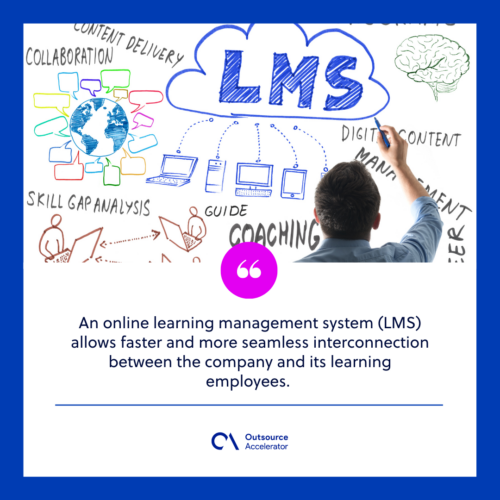
An online learning management system (LMS) links a company with its learning employees. As a result, training moves faster and feels more seamless.
The system also works well for school-like settings. For example, teachers upload their lectures onto the LMS. Then students learn them when it suits them. Students can also submit their assignments to the system.
Of course, like a school, a group must handle the admin duties on the system itself. So LMS administrators bring a human direction to the automated online learning system.
What is an LMS?
A learning management system (LMS) is a digital platform that delivers learning content. It also tracks and reports on student progress. So it acts as the backbone of any online learning program.
An LMS can be used in many ways. Most often, it provides online courses for students. Still, many platforms also offer content management, team collaboration, and learning data analytics. To compare options, browse these learning management system companies.
Companies also use it to host a library of resources for staff at all levels. In addition, they use it for employee onboarding materials. With proper LMS administration, companies can deliver high-quality eLearning content.
Essential duties in LMS administration
Managing an LMS is like running a small online school. The list of duties is wide. So it makes sense to build a team for your LMS administration.
Students’ satisfaction,[2] and their overall results, rely heavily on how easy the LMS is to use. Because of this, make sure you have capable developers for these roles.
Here are the main roles in LMS administration.
Overall LMS administrator
This is the main role an LMS administrator holds. It involves building an LMS rollout timeline and delegating tasks. Overall, these admins guide much of the content the system will hold.
This role also manages the other admins and checks that they do their jobs well. In addition, they hold the most access to data, which helps them improve efficiency.
Root admin
This role has access to everything in the system. As the name “root” suggests, it serves as the backup to the overall LMS administrator.
Should the main admin be unable to work, the root admin steps in. So the system keeps running without gaps.
Often, the only things they cannot touch are payment, account deletion, and management of other admins.
Content admin
Everything tied to content sits with this role. This includes products, categories, discussions and forums, submissions, and the newsfeed.
At times, they also produce content or assign others to do so. This role pairs well with microlearning content that is short and easy to finish.
Content admin manager
This role is an upgrade to the content admin role. Compared with the content admin, it can access content reports and manage learner accounts.
All learner management sits with content admin managers. They moderate the amount and quality of content that passes through the LMS. They also handle the onboarding of new learners.
Marketer
Sadly, in many schools or companies, the LMS does not appear in a browser search. So the marketer must get the word and visibility out there.
Marketing, after all, is a big part of what makes a product look great. As a result, all marketing tools on the LMS go to this role.
Third-party tools like Google or Mailchimp often link with an LMS. So the marketer may also handle them. Some backend work, such as updating website code, may fall here too.
Teaching Assistant
This role also deals with content. Unlike the other two content roles, though, it has less access. The teaching assistant mainly supports the learners.
As the name shows, this is the assistant teaching role for the online school that is the LMS.
This role works directly with users. For example, they answer queries, review assignments, and resolve pain points. Steady support like this also feeds a culture of continuous learning across the team.
Importance of LMS administration
Those in charge of LMS administration keep the whole system running. It is a crucial role, since the system falls apart without it.
They build and apply clear policies that fit your company’s standards. Without proper LMS administration, the system turns into a bog of content and web pages.
The school or company might instead dump all learning material into a shared online drive. Then students and staff must figure things out on their own. A structured online learning platform avoids that mess.
An LMS administration team balances the technical and content sides. As a result, strong admins support a learning program from many angles.
Their work often gives them better insight into the system than the school or company itself. Also, a personalized team beats the basic support most LMS providers offer. Smooth automated onboarding is one clear payoff of this care.
Without proper care and maintenance of your company’s LMS, you risk losing valuable data and the ability to effectively train your employees. An LMS administration team, whether internal or outsourced, is a must.
References
- Acquisition of skills. Oduma, C.A., Onyema, L.N. and Akiti, N., 2019. E-learning platforms in business education for skill acquisition. Nigerian Journal of Business Education (NIGJBED), 6(2), pp.104-112.
- Students’ satisfaction. Ohliati, J. and Abbas, B.S., 2019. Measuring students satisfaction in using learning management system. International Journal of Emerging Technologies in Learning (Online), 14(4), p.180.
Frequently asked questions about LMS administration
What does an LMS administrator do?
An LMS administrator sets up and runs the learning platform. They manage users, content, and reports. As a result, courses stay organized and learners get a smooth experience.
How many roles does LMS administration need?
Most teams use several roles, not just one. These include an overall admin, a root admin, content admins, a marketer, and a teaching assistant. So the work stays shared and steady.
Should you outsource LMS administration?
Outsourcing can be a smart move. It gives you skilled admins without the cost of a full in-house team. Still, weigh your data needs and support hours first.
What is the difference between an LMS and an online drive?
An LMS delivers, tracks, and reports on learning. A shared drive only stores files. So an LMS gives structure that a drive alone cannot.
Why is LMS administration important for training?
Good administration keeps content clean and current. It also protects learner data. Because of this, your training stays reliable and easy to use.






 Independent






