
Outsource Accelerator’s Employee Cost Calculator


What is an employee cost calculator and how does it help?
An employee cost calculator is a tool that estimates the full cost of hiring a worker, including salary, benefits, and taxes, so you can budget and compare hiring options with confidence.
- It adds up salary, benefits, and payroll taxes in one place.
- It shows the true cost of a hire, not just the base pay.
- It helps you compare onshore and offshore options fast.
Do you ever wonder how much it really costs to hire an employee? Labor costs can be a big expense for any business. So understanding them is key for good budgeting and decisions.
To help businesses work out labor costs, Outsource Accelerator (OA) offers an Employee Cost Calculator, also called the Team Builder. It weighs many factors for you.
What is an employee cost calculator?
An employee cost calculator is a handy tool that estimates the overall cost of hiring an employee. It weighs many factors and gives a clear breakdown of the expenses. As a result, you can make smart choices about your hiring budget. It also helps you explore cost-saving options.
Labor or employee cost calculation
A common labor cost calculation works like this:
1. Calculate gross pay
If employees work full-time (40 hours per week), multiply by the weeks in a year (40 x 52 = 2,080 hours). Example: at $10 per hour, the gross pay is $20,800 per year.
2. Estimate net hours worked
Next, factor in absences, such as 15 days a year at 8 hours per day. Subtract those hours from gross hours to get net hours worked (2,080 – 120 = 1,960).
3. Sum additional annual costs
Then add taxes, insurance, benefits, overtime, and supplies.
4. Compute annual payroll labor cost
Then add gross pay to the other annual costs (for example, $20,800 + $3,900 = $24,700).
5. Estimate actual hourly labor cost
Next, divide the annual payroll labor cost by net hours worked ($24,700 / 1,960 = $12.60).
6. Approximate labor cost percentage
Finally, work out labor cost as a share of total revenue. Example: if revenue is $80,000, the labor cost percentage is 30.9%. For a fuller plan, see this guide on how to calculate a payroll budget.
Labor costs and other factors to consider
Before we dig into Outsource Accelerator’s Outsource Calculator, let’s cover labor costs. In short, labor cost, or employee cost, is the total a company spends on a worker. These costs include the following.
Salary and wages
Here is the lowdown on salary versus wages. Salary is a fixed amount, no matter how many hours a person works. Wages, on the other hand, change with the hours put in. Also, do not forget bonuses, commissions, and overtime pay, since those add up too.
For simplicity, let’s focus on hiring workers in the Philippines. Firms that offshore work to Filipino staff usually offer a minimum of USD 500 or PHP 25,000 monthly salary. To weigh other regions, this country-based salary comparison is a useful check.
Benefits and perks
Let’s talk about the extras that come with staff: the perks and benefits. For example, to find the average benefit cost per worker, divide the total benefit cost by the number of employees.
In the Philippines, many firms delegate work to local staff. So you can expect these unique benefits in a Filipino worker’s package:
- PhilHealth and HMO. PhilHealth and HMO contributions give health cover and help with medical costs.
- Social Security System (SSS). SSS provides social insurance for sickness, maternity, retirement, and more.
- Pag-IBIG Fund. PAG-IBIG offers housing loans, short-term loans, and savings plans.
- 13th-month pay. 13th-month pay is an extra month’s salary given during the Christmas season.
- Holiday pay. This is extra pay for staff who work on regular holidays.
- Night shift differential. This is extra pay for night work, which is common for offshore teams in other time zones.
Payroll taxes
When you run a business, you must handle payroll taxes. As the employer, you pay these taxes on behalf of your team. If you have Filipino staff, you can get help with accurate tax math from the Bureau of Internal Revenue. You can also team up with payroll specialists.
Other factors that go into employee cost
Several factors shape labor costs. Here are some key ones to note:
- Experience. The more experience a worker has, the higher their pay expectations.
- Location. Offshore staff, such as those in the Philippines, often cost less than onshore hires.
- Niche. Niche roles need special skills, so they are harder to fill. As a result, they can cost more.
- Demand. High demand lifts pay. For example, a shortage of web developers pushes salaries up.
Given all this, working out true labor cost gets complex fast. That is where an employee cost calculator comes in handy. It can also show why offshoring can cut labor costs by up to 70%.
Features of Outsource Accelerator’s employee cost calculator
When you use an employee cost calculator, look for features that make it work well. OA’s Team Builder, for example, offers the following.
Salary estimator
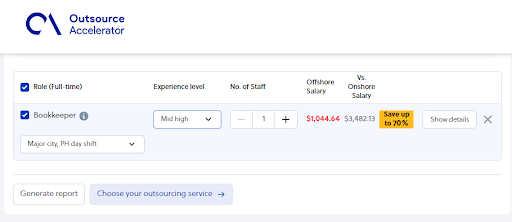
This feature estimates salary based on experience, job role, and location. As a result, you get accurate data for your labor cost math. For example, say you want a bookkeeper with a mid-to-high experience level. Then the tool shows the role’s estimated offshore and onshore salary.
It also factors in full-time, part-time, or freelance work. On top of this, it weighs the candidate’s location and your preferred shift.
Benefits and deductions
A good calculator also factors in benefits and deductions. For example, it covers health insurance, retirement plans, and payroll taxes. As a result, the final estimate includes all the real costs.
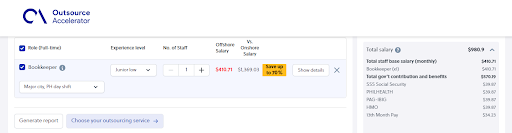
Let’s keep using the full-time bookkeeper example. OA’s Team Builder shows the breakdown of benefits and deductions in a Filipino payslip. For instance, the panel on the right lists the base government contributions and benefits in the package.
Currency conversion
For firms outsourcing abroad, a currency conversion feature is a must. It should weigh exchange rates and possible swings. In addition, OA’s calculator has this feature. It also lets you view the cost per month or per year.
Customization options
A flexible calculator lets you enter variables that fit your business. OA’s tool asks specific questions, so you get a more accurate estimate.
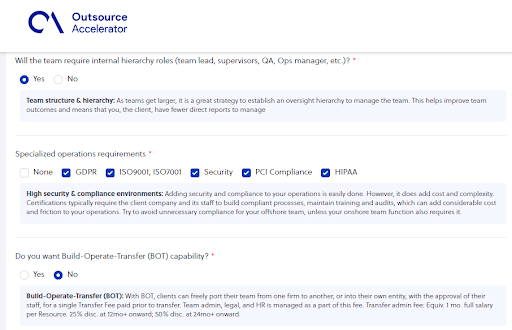
Some key questions from the tool include:
- Where will your staff work from?
- Which city for the office location?
- What hardware do you need?
- What team size do you want?
- How much project growth do you expect?
- Who will manage the staff and operations?
- What specialized operations do you need?
- Do you want Build-Operate-Transfer (BOT) capability?
If BOT interests you, this guide explains how build-operate-transfer works in practice.
How to use Outsource Accelerator’s Employee Cost Calculator
Using the Employee Cost Calculator is simple. Here is a step-by-step guide.
1. First, visit the Outsource Accelerator site and open the Team Builder page.
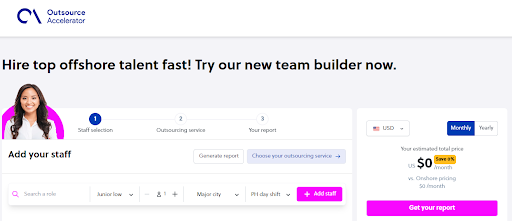
2. Next, pick the role you want to fill. In this case, we look for a full-time bookkeeper in a major Philippine city who can work US day shifts.
3. Then review the results, which estimate the total labor costs.
4. After that, answer more questions about the outsourcing service you want. This step helps the Team Builder tailor the estimate.
5. Once you set out all your needs, the tool generates a report with the approximate labor cost.
6. Finally, download the full report after you register with Outsource Accelerator’s services.
Calculate the cost of an employee with Outsource Accelerator
Ultimately, labor costs play a big role in financial planning. So it helps to know the factors that shape them, such as experience, location, niche, and demand. With the Employee Cost Calculator, businesses can estimate the true cost of a hire.
The Team Builder’s features add real value here. For example, it offers salary estimates, benefit math, currency conversion, and custom options. As a result, you can make smart choices about your hiring budget. You can also explore cost-saving options, such as offshore staffing solutions in the Philippines. In short, use this tool to boost your efficiency and profit.
Frequently asked questions about the employee cost calculator
What does an employee cost calculator include?
It includes salary, benefits, and payroll taxes. It also factors in location and role. As a result, you see the full cost of a hire, not just base pay.
Why is the true cost of an employee higher than their salary?
Because benefits, taxes, and overhead add up. In fact, these extras can raise the total well above the base wage.
How does location affect employee cost?
Location shapes pay a lot. For example, offshore staff in the Philippines often cost less than onshore hires with similar skills.
Can the calculator help me compare onshore and offshore hires?
Yes. OA’s Team Builder shows both onshore and offshore estimates. So you can compare options side by side before you decide.
Is the Employee Cost Calculator free to use?
You can run estimates for free. However, to download the full, detailed report, you register with Outsource Accelerator’s services.
Key takeaways
- An employee cost calculator shows the true cost of a hire, not just salary.
- It adds up salary, benefits, and payroll taxes in one place.
- Location, experience, niche, and demand all shape labor costs.
- OA’s Team Builder compares onshore and offshore estimates fast.
- Use it to plan your hiring budget and find cost-saving options.






 Independent





