
AI for productivity: How smart businesses are leveraging artificial intelligence


What is AI for productivity, and how are businesses using it?
AI for productivity means using artificial intelligence tools to cut repetitive work, speed up decisions, and lift output, so people spend more time on high-value tasks.
In short, smart teams treat AI as a co-pilot, not a replacement. So the goal is better work, not just more of it. Here is what the shift looks like:
- Routine tasks move to AI, freeing people for deep work.
- Adoption is high, but deep daily use is still growing.
- AI skills now shape pay, hiring, and promotions.
Digital transformation has brought a powerful new force: artificial intelligence (AI). AI was once a subject of science fiction. However, it has now settled firmly into the modern workplace. So the question is no longer if AI will change how we work, but how. To understand the real impact, Hubstaff, a workforce analytics and time tracking platform, released the AI Productivity Shift report. It is based on a global survey of over 3,000 professionals and anonymized data from 140,000+ users. As a result, the report offers one of the most complete looks into how AI is reshaping modern work.
What is AI productivity?
AI productivity means using artificial intelligence tools to improve efficiency, cut repetitive tasks, and raise output quality. Rather than replacing jobs, AI tools increasingly act as co-pilots. For example, they streamline workflows, speed up decisions, and let people focus on high-value work. So the smartest teams build AI into daily work rather than bolting it on.
Hubstaff’s key findings on AI for productivity
Hubstaff’s report shares the following findings on the current state of AI productivity at work.
Adoption vs. usage: A wide gap
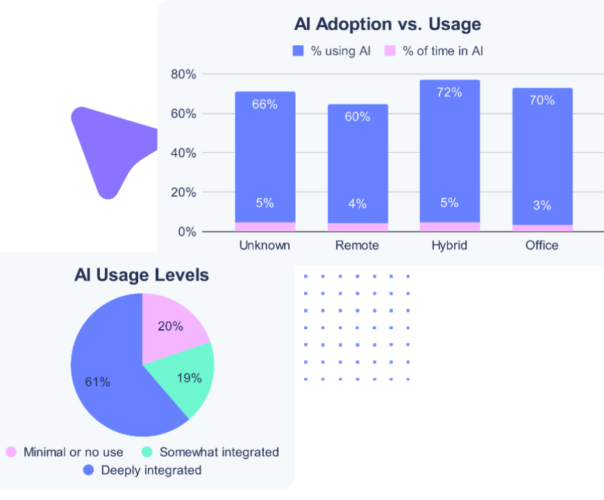
The Hubstaff report reveals a clear disconnect. While 85% of professionals report using AI, it accounts for only 4% of actual work time. For context, that mirrors usage rates for core tools like Slack (3.53%) and Gmail (3.91%). So AI is being used, but not yet deeply integrated. In fact, many generative AI tools still sit at the edge of daily work.
The AI productivity paradox
Despite wide adoption, many companies are still in the experiment phase. Only 60% use AI regularly, and 20% are still testing the waters. So this paradox of high adoption but low operationalization is telling. While AI’s promise is clear, many teams struggle to move past surface-level use. However, this is set to change. The World Economic Forum projects that around 170 million new roles will be created by 2030. About 92 million jobs will be displaced, for a net gain of roughly 78 million.
AI’s impact on task completion and focus
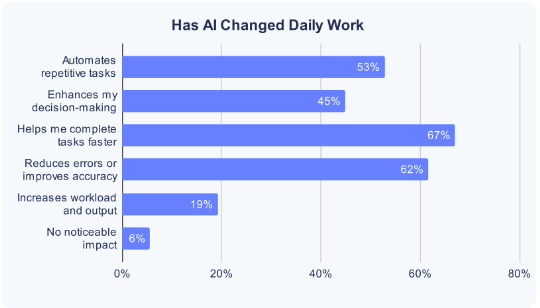
Still, for those who embed AI into their workflows, the gains are large. According to the report:
- 77% say AI reduces task time
- 70% report increased focus and fewer distractions
- AI users spend 23% less time on unproductive tasks and take more effective breaks
So this reallocation of time opens the door to deep work and strategic thinking. As a result, teams build the cornerstones of long-term productivity.
Roles and industries leading the charge
Certain professions are emerging as early AI productivity leaders:
- SEO specialists lead with 89% adoption, spending 9% of their time in AI tools
- Marketing managers and executive assistants follow closely
- Writers, creative professionals, and small teams (under 10 people) also show high engagement
Meanwhile, industries like healthcare and finance are slower to adopt, because of compliance and legacy systems. Still, they are ripe for change. For many firms, AI outsourcing offers a faster path to these gains.
The rise of AI fluency in hiring
AI is also reshaping talent acquisition. The report shows:
- 20% of companies have adjusted salaries to reflect AI proficiency
- AI-skilled professionals can earn 21 to 40% more than their peers
- 55% of employees say AI skills have opened new doors for promotions or roles
So AI fluency is quickly becoming a competitive advantage in the job market.
Practical strategies for maximizing AI productivity
Many firms have started using AI. However, the real gains come from execution, not experiments. So below are seven practical ways to unlock the true value of AI for productivity.
1. Pinpoint high-impact use cases in your workflows
First, find where AI can drive the greatest return. The report found that 67% of users see the most value in content creation. So that makes it the top productivity-enhancing function. Other high-impact areas include:
- Customer support: 35% reported faster response times and improved service quality
- Data analysis: one in three (~33%) said AI reduced reporting time and enhanced insights
- Admin tasks: nearly 30% used AI for scheduling, inbox cleanup, and documentation
- Decision-making: 24% relied on AI for faster, more informed strategic input
These areas often involve repetitive tasks. So AI can optimize them quickly, which frees teams for creative or strategic work. For context, McKinsey notes that 60% of jobs could see at least 30% of their tasks automated, freeing people for more advanced roles.
2. Choose tools that solve real problems, not just trending ones
Hubstaff’s research warns against chasing the latest AI tools just because they are popular. For example, while 90% of respondents use ChatGPT, daily use is often stronger with embedded tools like Grammarly or QuillBot that fit naturally into workflows. Here are some standout tools from the report:
- Descript: edit video by editing text
- TLDV.ai: auto-summarize Zoom meetings
- SurferSEO + ChatGPT: combine for faster, optimized content
- Magical + Motion: schedule meetings and automate updates
- Browse AI + Claude: monitor competitor sites and extract insights
The key is to match the tool to the workflow. For example, if your sales team struggles with CRM updates, AI can automate data entry or generate summaries. Meanwhile, if your support team needs faster resolutions, chat assistants can reduce ticket volume and lift satisfaction.

3. Integrate AI strategically, not just superficially
A core theme from the report is simple: treat AI as a process, not a plugin. So teams that see real value embed AI into core operations. For instance, high-performing teams:
- Automate real tasks like drafting emails or summarizing reports
- Track metrics like hours saved or output generated
- Scale successful use cases across teams
Hubstaff’s own platform data showed a clear pattern. Teams that use AI regularly complete more deep work sessions, take more meaningful breaks, and spend 23% less time on unproductive tasks. So these are not just small gains. In fact, they mark a structural shift in how work gets done, often supported by AI workflow automation.
4. Upskill and support teams continuously
A major barrier to adoption is skills. Nearly half of leaders said their teams lack the expertise to use AI well. Even among companies that use AI, only a quarter have launched formal training. To fix this:
- Offer role-specific AI training (e.g., marketing teams learning SurferSEO, support teams mastering chatbots)
- Encourage peer learning, and let early adopters lead internal workshops
- Promote platforms like Coursera, HubSpot Academy, and LinkedIn Learning for structured learning paths
Hubstaff notes that AI fluency is now a key hiring and promotion factor. So workers with AI skills are more likely to advance. In fact, some already earn 21 to 40% more, according to a University of Oxford study. As a result, supporting team development today secures your future advantage.
5. Create a clear AI policy and ethical framework
With great power comes the need for guardrails. So 65% of AI-using companies now have formal policies, and for good reason. Without clear guidance, even powerful tools can cause confusion, risk, or harm. A strong AI policy should cover:
- Approved tools and use cases
- Data privacy protocols: disable public model training when using sensitive info
- Ethical boundaries: define when human oversight is required
- Responsibility for AI-generated decisions
Hubstaff stresses that trust and accountability are essential for long-term success. As one survey respondent put it: “AI can guide, but not govern. Leadership still requires human judgment.”
6. Measure outcomes and optimize continuously
AI productivity is not measured by adoption rates. Instead, it is measured by outcomes. Yet over 30% of organizations still cannot quantify AI’s impact, according to Hubstaff. To fix this, set specific KPIs tied to productivity, such as:
- Time saved per task or project
- Number of deep work sessions completed
- Quality improvements or error reduction
- Speed of delivery (e.g., turnaround time)
- Customer satisfaction scores if AI is used in support
Hubstaff’s own metrics, like tracking focus time and interruptions, offer a roadmap for others. So companies that treat AI as a measurable lever will keep improving. Meanwhile, others stay stuck in trial mode.
7. Foster a culture of AI experimentation and knowledge sharing
One of the most overlooked drivers of AI productivity is culture. According to the Hubstaff report, the most AI-fluent teams are not led by top-down mandates. Instead, they are driven by individual contributors and mid-level managers. These people experiment early, build AI into their processes, and share what works. To create this kind of environment:
- Encourage team-level pilots where employees can test AI tools in low-risk ways
- Celebrate small wins, and highlight stories of how AI saved time or improved output
- Create AI champions within departments to help others get started
- Set up channels for sharing use cases, tips, and feedback across teams
Nearly 1 in 5 Hubstaff users reported that AI raised their workload yet also boosted their output. So when teams use AI creatively and together, they generate more value, not just more tasks. Moreover, the report shows that 47.5% of teams using AI have reduced employee work hours, with leadership roles seeing the greatest benefit. As a result, AI drives meaningful gains when backed by a strong community and a learning-oriented culture.
The future of AI and productivity
AI tools are becoming more specialized and integrated. From AI writing assistants to predictive analytics, the stack keeps growing. So expectations grow too. In fact, over 70% of companies expect at least 21% of their workflows to be AI-assisted within two years. Many will lean on specialized AI business tools to get there. Hubstaff’s AI Productivity Shift report makes one thing clear. AI is not about doing more, it is about doing better. So from deeper focus to new career advantages, AI for productivity is real, but only when used with intention. Ready to get started? The AI Productivity Shift report offers valuable insight into the current state of AI at work and its power to reshape how we work. While challenges remain, the opportunity to lift productivity is significant. So, for the full breakdown, Download the Hubstaff report.
Frequently asked questions about AI for productivity
Does AI replace jobs or support them?
For most teams, AI acts as a co-pilot, not a replacement. So it handles repetitive work while people focus on judgment and strategy. As a result, many roles grow more valuable, not less.
Why do so many companies use AI but see little gain?
Adoption is easy, but deep integration is hard. For example, many teams try a tool once and never build it into daily work. So the gains stay small until AI becomes part of the core process.
Which tasks benefit most from AI?
Content creation, customer support, data analysis, and admin work lead the way. These tasks repeat often and follow clear rules. So AI can speed them up quickly and free people for creative work.
How do you measure if AI is improving productivity?
Track outcomes, not just adoption. For example, measure time saved per task, error reduction, and turnaround speed. So you can prove the value and keep improving.






 Independent






