
Top 20 Slack games for hybrid and remote teams in 2026


What are the best Slack games for remote teams?
Slack games are short, fun activities that teams play inside Slack channels. They break the ice, spark laughs, and pull remote coworkers closer. As a result, morale climbs and the workday feels lighter.
In short: the best Slack games mix quick play, light competition, and easy setup, from trivia bots to chess.
- They boost morale for hybrid and remote teams.
- Most run through simple Slack app integrations.
- Options range from trivia and word games to raffles.
List of the top 20 Slack games
- Dungeons & Dragons
- Speak Your Own Adventure
- Meme Review
- Plop
- Liar’s Dice
- PokéQuiz
- Q&A
- Get
- Trivia
- Would
- Tic
- Hangman
- Rock
- Connect Four (Open-source)
- Word of the Hour
- Chess
- Fact or Fiction
- Pingpong
- Jukebot
- Raffle
With so many teams working remotely, connecting with your department can feel easy or hard.
Sometimes the team needs a pick-me-up. Often, that starts with games and icebreakers.
So, if your department uses a chat app, these fun Slack games can lift everyone’s spirits.
What is Slack?
Slack is a messaging platform for businesses that want more than email. With this app, users create channels for each team or group.
Beyond workplace collaboration, Slack also connects to third-party tools. For example, it links to Google Workspace and grants permissions from the app itself. As a result, this convenience drives many firms to adopt it.
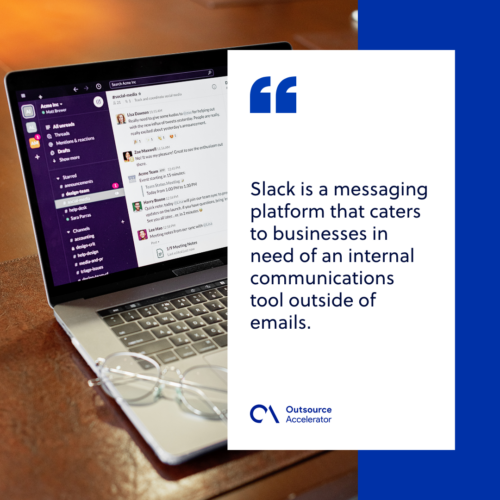
Reasons why remote teams prefer Slack
Slack gives teammates a place to connect and work together asynchronously. Async communication matters most for teams across time zones. It is not perfect. Still, a shared app makes a big difference.
It’s free
The free plan fits startups and small teams well. Small-to-medium businesses can test it at no cost. There is a caveat, though. Free users see only recent messages, and video calls stay one-to-one. However, many firms still make Slack their main messaging app.
It’s easy to use
Looking for a plug-and-play chat app? Slack is a strong pick. Its interface is clean and easy to learn. Channel owners can name each channel clearly, such as #general, #content-team, or #after-hours. In addition, Slack offers round-the-clock support for questions and feedback.
It’s accessible
With remote and hybrid teams, not everyone uses the same system. However, Slack runs on all major platforms, including Linux, Android, and iOS. If you cannot install the app, it also runs in browsers like Chrome, Edge, and Safari. All you need is a device and an internet connection.

Slack app directory
The Slack App Directory is a marketplace for apps that plug into Slack. These apps boost features and help teams streamline work. To open the directory, follow these steps.
- Open your Slack workspace.
- In the left sidebar, click “Apps.”
- This opens the App Home, where you can find “Browse.”
- Click “Browse” to explore the directory.
From there, you can search apps, browse categories, and find new tools for Slack.
20 Slack games for remote and hybrid teams
This messaging app is not just about work chat. In fact, Slack has fun features that spark casual talk and team play. It also works well for team-building or happy hour. Below are the best Slack games for in-house, remote, and hybrid teams.
1. Dungeons & Dragons
For example, this tabletop role-playing game now fits remote team building. Through Slack, anyone can play D&D anytime and anywhere. As a result, here is how to start.
- Create a special #dnd-channel.
- Use Slack’s D&D dice roller app.
- Pick a dungeon master and choose a storyline.
2. Speak Your Own Adventure
Like D&D, this is a multiplayer roleplaying game. However, it needs nothing but imagination and creativity. To play, just install a bot right into the #games channel.
3. Meme Review
Popularized by YouTubers and Twitch streamers, this game reacts to trending memes. However, in the safe-for-work version, teams react to workplace memes instead. To start, players hop on a video call in the #games channel and share a screen.
4. Plop
Plop helps coworkers recognize each other’s faces outside meetings. As a result, it warmly welcomes newcomers. The bot queues up profile pictures for a quick guessing game.
5. Liar’s Dice
Test your bluff detector with this app. In fact, players work together to find the liar or read between the lines. The rules are simple. For example, each player guesses how many dice are on the table, and the closest guess wins.
6. PokéQuiz
Is your team full of Pokémon fans? If so, they will enjoy this game. As the name suggests, the questions revolve around Pokémon. It is score-based, so the highest score wins.
7. Q&A
One of the best boredom breakers is a trivia game like Q&A. With this bot, players get random questions to answer. It does not keep score. Still, players can set up a system of their own.
8. Get to Know (Icebreaker questions)
Some Slack games are competitive. Others simply help coworkers know each other better. For example, icebreaker games are a fun way to kickstart a team-building session.
9. Trivia
Trivia is one of the more popular Slack games. It puts everyone’s general knowledge to the test. First, the game master picks a theme. Then players team up or go head to head.
10. Would You Rather
Is the team tired of the usual Slack games? Would You Rather can break the monotony. It makes players really think about their choices. Often, they must justify those choices, much to everyone’s amusement. You can also build your own version with a poll or quiz app.
11. Tic-Tac-Toe
Ricotta is a lesser-known integration that hosts social games like Tic-Tac-Toe. Small, quick games like this break the monotony of remote work. As a result, they ease the brain fog many remote workers feel midday.
12. Hangman
Also available via Ricotta, Hangman is a classic everyone knows. Starting with blanks, each player guesses a letter in the word. Meanwhile, players race to solve it before the game master “hangs the man.”
13. Rock, Paper, Scissors
Need a low-stakes decision in a flash? This game can help. For example, it can pick the next game master for team building. With the Janken app, remote rock-paper-scissors has never been easier.
14. Connect Four (Open-source)
Connect Four is an open-source bot that runs right inside Slack. As a result, the team can play without ever leaving the app. So, turn Fridays into Connect Four tournaments before the weekend.
15. Word of the Hour
Learning a language alone is hard. However, you can make it fun for the whole team. Once integrated with Slack, Word of the Hour shares a new word every hour. It is not a game by itself. Still, players can challenge others to build a sentence with each word.
16. Chess
Stimulate the team’s brains with a round of chess. Because it is native in the app, players stay productive between turns. The game sits within a thread. Still, a dedicated #games channel helps.
17. Fact or Fiction (No bots needed)
Another icebreaker is the age-old question, “Is it a fact or fiction?” There is no bot to install. Instead, the game master shares statements, and players guess if each is real.
18. Ping-Pong
In fact, Slack games can turn physical sports into online contests. After you install the Ping-Pong app, players can start a match right in the #games channel.
19. Jukebot
Karaoke and remote singalong sessions have never been easier. Connect a Spotify account through Jukebot and set a playlist for work. To make it social, each teammate can queue songs with Slack’s slash commands.
20. Raffle
Save raffle games for bigger sessions like holiday parties. With higher stakes, team members tend to engage more. As a result, participation climbs.
How Slack games help employee morale stay high
Remote work can feel lonely at times. In fact, virtual employees have reported feeling lonely due to the isolated nature of a work-from-home setup. However, weekly games and hangouts close that gap. As a result, employees grow more active, confident, and present over time.
Frequently asked questions about Slack games
Are Slack games free to play?
Many Slack games are free or offer a free tier. For example, Chess and Connect Four cost nothing. However, some bots charge for advanced features.
How do Slack games help remote teams?
They build connection and cut isolation. As a result, morale and engagement rise. In addition, they make onboarding feel warmer.
How do I add a game to Slack?
First, open the Slack App Directory. Next, search for the game bot you want. Finally, install it and invite it to a channel.
What is the best Slack game for large teams?
Trivia and Raffle work well for big groups. Because they scale easily, everyone can join. Still, smaller games like Chess suit one-on-one play.
Key takeaways
- Slack games help remote and hybrid teams bond and stay engaged.
- Most run through quick app integrations in the Slack directory.
- Choices range from trivia and word games to chess and raffles.
- Icebreaker games like Get to Know suit new teammates.
- Regular play lifts morale and cuts the isolation of remote work.






 Independent





