
Automation in IT operations: the complete guide

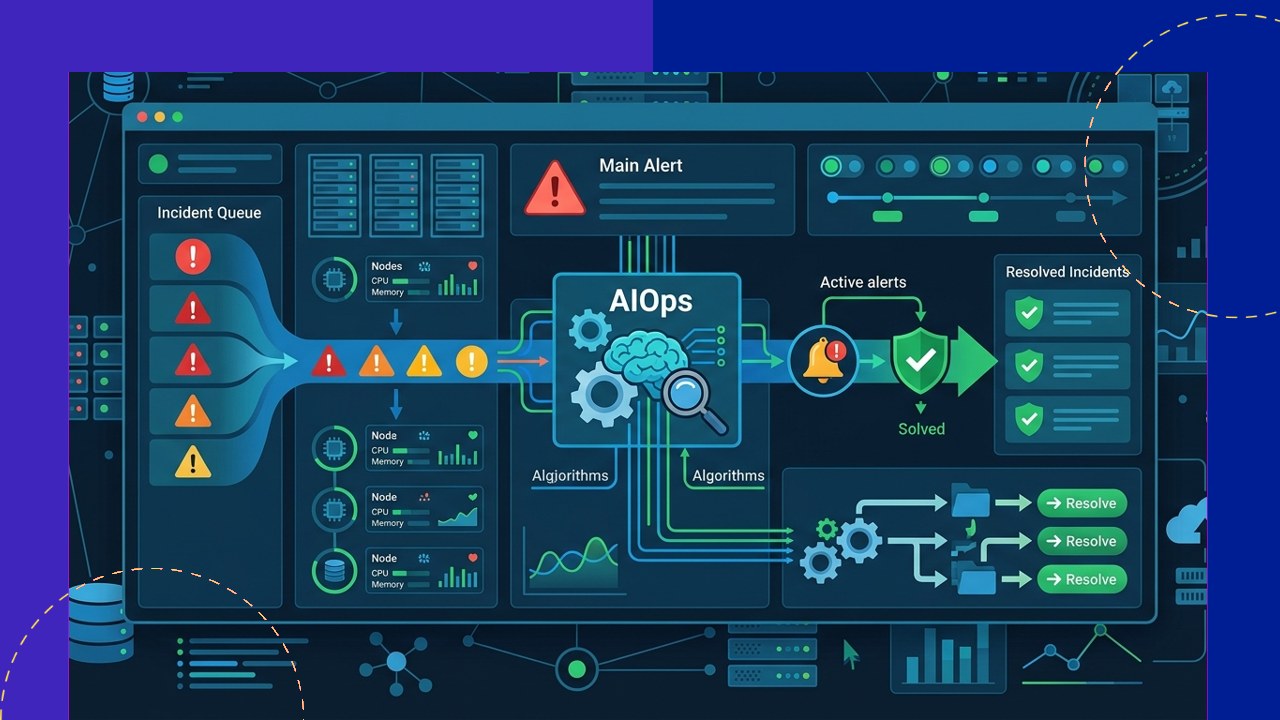
- Automation in IT operations replaces repetitive manual work with software. It handles tasks like monitoring, patching, provisioning, backups, and ticket routing through rule-based or AI-assisted processes.
- The payoff is higher uptime, faster incident response, fewer human errors, and lower cost. But success depends on the right tooling, skilled people, and clear governance.
- Many companies reach these outcomes faster with outside help. They tap outsourced IT or managed services teams that already run mature automation frameworks.
Automation in IT operations means using software to handle routine technical tasks that people once did by hand. That includes watching servers, applying patches, spinning up infrastructure, and closing tickets. The goal is a system that runs, corrects, and reports on itself with minimal manual touch.
As environments grow across cloud, on-premises, and hybrid setups, manual operations struggle to keep pace. Automation gives teams a consistent, repeatable way to keep services healthy while freeing engineers for higher-value work.
This guide covers what IT operations automation includes and where AIOps fits. It also looks at the benefits, the challenges, and how outsourced providers put it to work.
What IT operations automation covers
IT operations automation spans the full lifecycle of keeping systems available and secure. Most programs start with a few high-volume tasks and expand as trust in the tooling grows.
Monitoring and alerting
Automated tools track performance, capacity, and availability across servers, networks, and applications. Instead of staff watching dashboards, the system flags anomalies. It sends targeted alerts only when a metric crosses its threshold.
Incident response
Automation can acknowledge alerts, run diagnostic checks, and restart a failed service. It can also open and escalate a ticket without waiting for a human. NIST’s incident response guidance stresses building repeatable response steps into risk management, which is exactly what automation encodes.
Patching and provisioning
Patch automation identifies, tests, and deploys updates on a schedule. NIST describes patching as “a critical component of preventive maintenance” in its enterprise patch management guidance. Provisioning tools stand up servers, containers, and user accounts from templates in minutes rather than days.
Backups, ticket routing, and runbooks
Scheduled backups run and verify themselves, while ticket routing sends each request to the right queue automatically. Runbooks are the documented steps for handling a known issue. They become executable scripts, so a fix runs the same way every time.
Where AIOps fits in
AIOps, or artificial intelligence for IT operations, adds machine learning and analytics on top of basic automation. Where rule-based automation follows fixed instructions, AIOps learns patterns from historical data.
It correlates thousands of alerts into a single probable root cause. It also predicts capacity problems before they hit. And it reduces alert noise, so teams focus on real issues. In practice, AIOps and scripted automation work together: the AI decides what needs doing, and automation carries it out.
Manual versus automated IT operations
The contrast is clearest when you compare the same tasks done by hand against an automated workflow.
| IT operations task | Manual approach | Automated approach |
|---|---|---|
| Monitoring | Staff watch dashboards and react after issues appear | Continuous checks with anomaly-based alerts, day and night |
| Patching | Updates applied server by server, often delayed | Scheduled, tested rollouts across the fleet at once |
| Provisioning | Tickets and hands-on setup take hours or days | Template-based build in minutes with consistent config |
| Incident response | Engineer paged, then diagnoses from scratch | Auto-diagnosis, self-healing, and escalation only when needed |
| Backups | Manual jobs that may be missed or unverified | Scheduled runs with automatic verification and alerts |
Benefits of automating IT operations
The strongest case for automation is measurable operational improvement rather than technology for its own sake.
Uptime and speed
Automated monitoring and self-healing catch and fix problems faster than a paged engineer can. That shortens outages and protects service levels. Provisioning and deployment that once took days can finish in minutes.
Fewer errors and lower cost
Machines follow the same steps every time, so misconfigurations and skipped procedures drop sharply. Software also handles the routine work, so a lean team can support a much larger environment. That lowers the cost per system managed.
Challenges to plan for
Automation is not a set-and-forget project. The common obstacles are practical, not just technical.
Tooling and integration
Most environments run a mix of monitoring, ticketing, and deployment tools. Vendors never built these tools to talk to each other. Stitching them into one workflow takes planning and, often, middleware.
Skills and governance
Automation shifts the work from manual execution to designing, coding, and maintaining scripts, which requires different skills. Teams also need governance. That means clear rules for what automation can change, approval gates, and audit trails. These controls keep an automated action from causing uncontrolled damage.
How outsourced IT and managed services use automation
Outsourced IT and managed services providers often run more mature automation than the clients they serve. It is core to how they scale across many accounts.
A managed provider typically brings a ready-made stack for monitoring, patching, backup, and ticketing. It also adds 24/7 coverage and documented runbooks. Clients get the benefits of automation without building the tooling and expertise in-house.
This model suits companies that want reliable operations but lack the scale to justify a full internal platform team. The provider handles routine automation, while internal staff focus on projects tied to the business.
Frequently asked questions
What is the difference between IT automation and AIOps?
IT automation runs predefined tasks through scripts and rules. AIOps adds machine learning that analyzes data to detect patterns, predict issues, and decide what action is needed, which the automation then executes.
Which IT operations tasks should be automated first?
Start with high-volume, repetitive, low-risk tasks such as monitoring alerts, routine patching, backups, and ticket routing. These deliver quick wins and build confidence before you automate more sensitive actions.
Does automation replace IT operations staff?
Usually not. It removes repetitive manual work and shifts staff toward designing automation, handling complex incidents, and improvement projects. The headcount often stays, but the work becomes higher value.
Is outsourcing IT operations automation a good idea?
For many mid-sized companies, yes. A managed provider brings proven tooling, 24/7 coverage, and skills that would be slow and costly to build internally, though you should keep clear governance and reporting in place.
Key takeaways
- IT operations automation covers monitoring, incident response, patching, provisioning, backups, ticket routing, and runbooks, with AIOps adding predictive, AI-driven decision-making.
- The benefits are higher uptime, faster response, fewer errors, and lower cost, but they depend on integration, skills, and governance.
- Automate high-volume, low-risk tasks first, then expand as confidence and tooling mature.
- Outsourced IT and managed services teams often provide the fastest route to mature automation without a large in-house build.






 Independent





